
Should You Upgrade to Squarespace Version 7.1?
Update: I have a newer post on the topic which you can read here.
September 2019.
So what’s the deal with Squarespace 7.1?
More and more people are asking me: Do I have to upgrade my website and how do I do this? Or if they are new to Squarespace: What version is better to start on? These are all great and very valid questions! Here is where we are right now:
Squarespace version 7.1 is fully released and available to all new English trials. You can still access 7.0 templates here.
What’s new and different in 7.1? A lot!
One Template
Even though there is still a selection of ‘templates’ for 7.1 these are in fact all based on one master template and share the same architecture. Which is good news! Because now we no longer have to learn about template families and their features, plus Squarespace can put all their focus on building out and supporting just one template.
Styling Groups
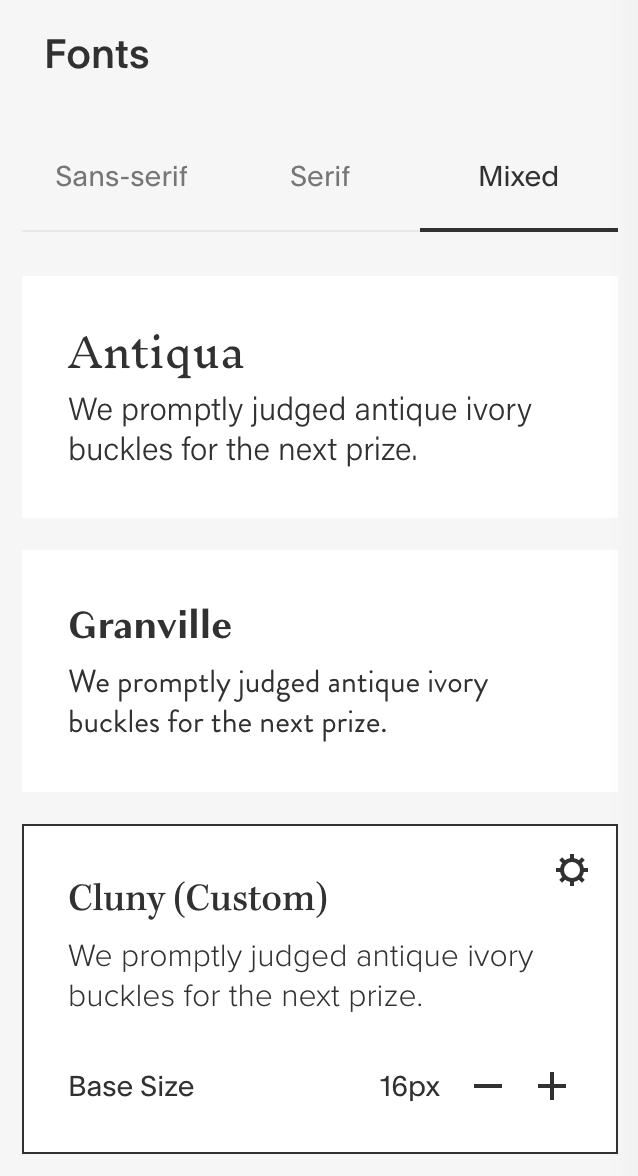
Rather than one central area where all design elements like colors, fonts and structural measurements are configured (Site Styles in 7.0) you now have styling groups, such as colors, fonts, buttons, spacing, image blocks etc. This is VERY different to what we are used to from 7.0 and I am still not sure how I feel about it. 7.1 uses predefined color palettes and font packs and even though you can drill down and change everything these predefined styles feel rather limiting, especially as their presentation is not intuitive.
For instance:
There is a font pack called ‘Cluny’ which contains a serif heading font (Cluny) and a sans serif body font. Say I like the body font but want to change the heading font to ‘Kepler’. I can do that but this does not change the font pack name to ‘Kepler’, it changes it to ‘Cluny (Custom)’. Ugh. Not impressed.
The color palettes have similarly confusing display limitations and I really hope that Squarespace are still working on making this clearer.
Another thing I really miss is the ability to click on a component on your page, for instance the site title, and then see all the relating styling options for it in one place, like the color and font. In 7.1 you have to go into the color and font sections separately. Lots of additional steps here and hard for someone like me who prefers to design as I go along.
However, once you have decided on your color palettes and fonts then the actual page design becomes easy. Which brings me to the next point:
Page Builder
The page builder is awesome and where I get excited about 7.1! There are no more indexes with sub-pages that serve as index sections, in 7.1 you rather have one page and then click on a + symbol right on the page to add new sections. I love it! You can easily add and move sections and adjust the page padding as well as the height and width of page elements, such as the header navigation. Plus, there is a large selection of pre-defined page layouts to chose from which makes building out a page easy and fun.
Differences
No blog sidebar! That’s a big one and I am not sure why Squarespace thought that bloggers no longer need/want a sidebar? Big miss.
No more parallax! I am honestly not sure why Squarespace did away with this? Was is a technical limitation or did they feel that as a design element parallax has run its course? All I know is that there are still a lot of people who love parallax and will miss it.
No more gallery blocks! While you can add gallery sections this is just not the same as having the in-page gallery block. With the block you can for instance put a slideshow next to a text block, and I also use the gallery block a lot to create a nice easy row of images between text blocks. The section gallery in 7.1 is ok but more limited. The slideshow, for instance, has no display options for the description or title. A total miss!
No cover pages. Personally, I have not used cover pages in a long time, but many people still love them. I guess you could design a regular page to get it to look similar to a cover page by removing the header and footer. But this would require some CSS and you’d never quite get the same look of a cohesive page that snaps to its edges. I stopped using cover pages because, while they looked great, they were adding one more step for site visitors to get to the info they wanted. Instead I just focused on designing a stunning homepage that is welcoming and informative, with appropriate call-to-action points.
No secondary navigation. We’ve all gotten used to and fallen in love with Brine’s secondary navigation! Taking that away again has upset a lot of people, it was such a wonderfully flexible option.
No share buttons. This is a big one for bloggers as offering the ability to share blog posts is very important for growing our audience. This is not too big of a deal to me, I just use Shareaholic, or AddThis is another good option. Obviously I prefer the built-in buttons like you get with the 7.0 Brine template because the look great and can be customized. Alas, Shareaholic works well for me for now.
Only one shopping cart icon. Again, we are used to more options from Brine here. It’s always hard when you take things away that people have gotten used to!
No developer mode. This does not effect me as I’ve never used developer mode because Squarespace does not support it. But again, many other designers love dev mode and reply heavily on it in their businesses. At least they can still use it with version 7.0.
Should you change to or start with 7.1?
Squarespace Newbies
Update: As of January all new Squarespace website start on 7.1. They have ironed out a lot of the bugs and improved the color and fonts editor – I love it now! Cliick here to get started and when you are ready to upgrade to a paid plan use the code KERSTIN20 to take 20% off (this applies to annual plans.) And enjoy!
Squarespace Veterans
If you already have a 7.0 website I would say wait. Unless you have a lot of time at your hand and are dying to get your hands on 7.1. You cannot actually migrate your 7.0 website with all its content, you have to build a brand new 7.1 site from scratch. Hence the time commitment. I will be redesigning my website - which is still on Bedford - to 7.1 in January 2020.
The Good News
7.0 is not going anywhere. In fact, Squarespace are still updating it with the latest and greatest changes. Like the new on/off button that is now a line with a circle. They confirmed that they will keep updating 7.0 for as long as it makes sense and they will continue to support it indefinitely. Just like they do with version 5. Brine for instance is such a popular and wonderfully flexible template, if you are using that I don’t see any reason to change away from it any time soon.
I am still playing around with 7.1 so the above list is by no means exhaustive. Have you looked at it? What do you think? I’d love to hear about other people’s experience with this new version.