
Asana or Notion? Nope. We Love Apple Notes!

As digital businesses, we’re not short of options when it comes to productivity and project management tools for running an online business. From Notion to Asana, to Basecamp and Trello, we’ve dabbled in quite a few.
But when I came on board as Kerstin’s Business Manager in 2020, we decided to use none of the above.
Instead, we keep the good ship Calm Business sailing smoothly using Apple Notes.
We did take a detour in 2023 and tried out Notion for the whole year. We liked Notion a lot, but in the end, it became too unwieldy, and using it no longer felt calm.
So we returned to Apple Notes, which also has great features but feels calmer and simpler. From everyday communication to task tracking, project planning, collaborative editing, and customer feedback… it all happens in this humble app.
Why we love Apple Notes and why it ticks so many boxes for our small but mighty team:
Automatic sync across devices
We are Apple devotees, so it’s great having everything instantly up-to-date and accessible on Mac, iPad and iPhone.
Simple, calm design
Some might call it basic, we call it peaceful! It’s uncluttered and easy on the eye.
Super speedy
The lack of bells and whistles means the app is fast to load. We can quickly click between the various notes and folders, easily cutting & pasting and dragging & dropping.
Easy to share
We work from a shared folder, so if one of us adds or edits a note, the other gets an unobtrusive notification right away. If notifications are disabled, we’ll see a little yellow dot beside any new or updated notes the next time we open the app.
Easy to search
We can quickly search text and there’s also an attachments browser for the visual stuff.
Easy to collaborate
We often brainstorm or edit copy on calls, so one will type, and the other can see what’s happening in real-time without faffing with Google Docs or Zoom screen sharing.
Easy to unplug
Notes is our primary point of contact (alongside our weekly call). We avoid email or messaging apps for team communication unless it’s genuinely urgent. With an 8-hour time difference between us, no one has to wake up to a pile of emails, and there’s just one place to look for updates.
It’s fun
We use the checkbox feature a LOT to make lists and always get a kick when we tick something off!
How we use Apple Notes
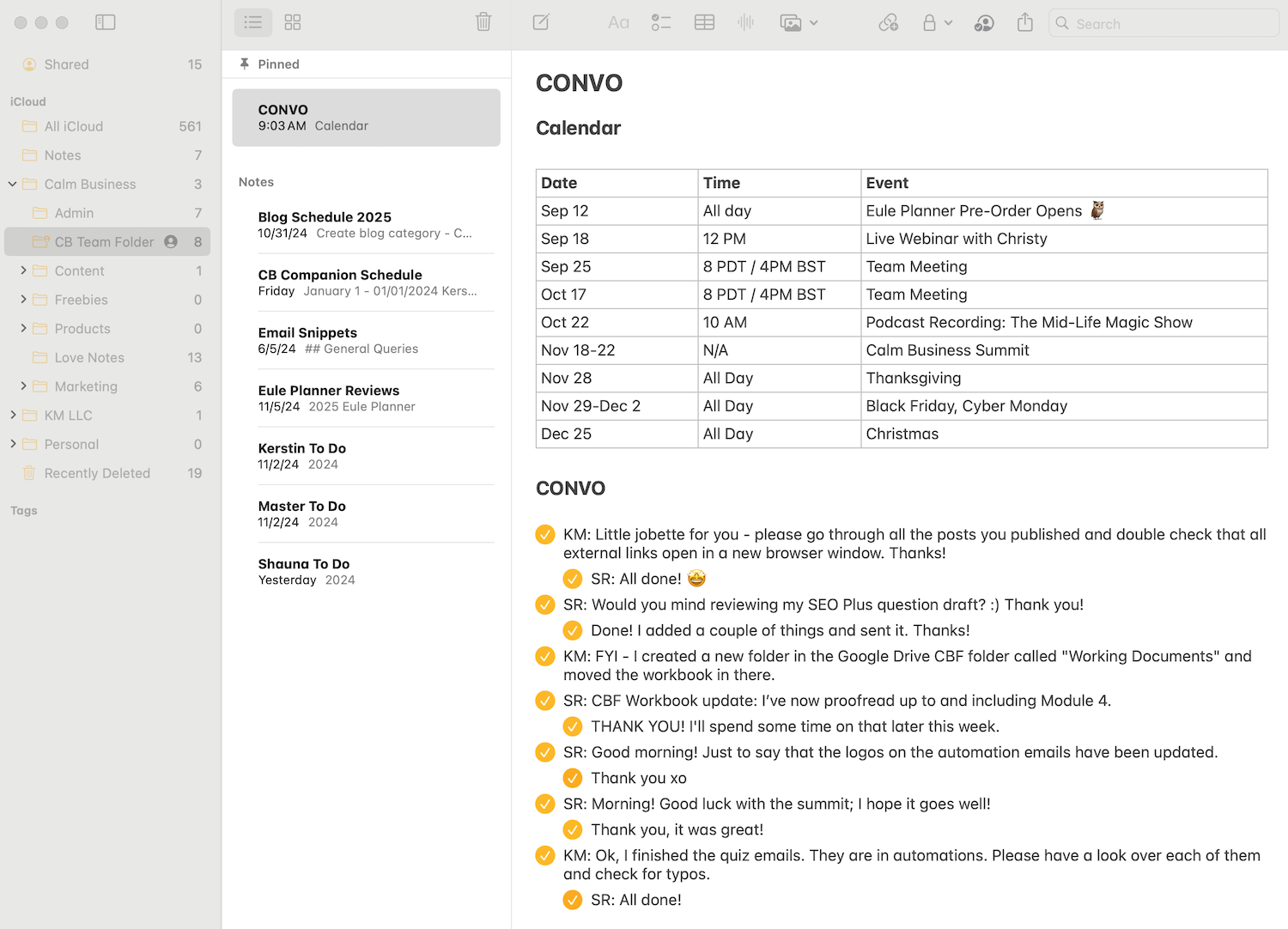
A snapshot of Team Calm’s Apple Notes
All the Team Calm action happens inside a shared folder called CB Team Folder. It’s home to a streamlined collection of meticulously organized notes, including:
CONVO
This is the Mothership of Team Calm communication! It is simply a “conversation” where we leave each other messages: questions, To Do’s, ideas, and occasional tangents! When the message has been read or actioned, one just clicks the checkbox to let the other know it’s done. Any follow-up questions go straight underneath, indented.
Master To Do List
This is the primary to do list for the year. We start with the year’s main priorities and then break them down into monthly and weekly tasks. We review these at our fortnightly meeting. It’s simple but flexible.Email Snippets
We save chunks of frequently used text so we can respond to common customer inquiries quickly and accurately.CB Companion Schedule
This is where we plan each week’s content for the Calm Business Companion, from scheduling topics to idea capturing. It’s so handy having everything in one place!
Other Folders
At the level above the CB Team Folder, Kerstin has a number of carefully curated folders for her various projects, including:
Love Notes
Kerstin keeps track of customer feedback in a series of notes. I love that she can take a screenshot on your phone or Mac, crop it, and share it straight to the relevant note in just a couple of clicks.Products
Kerstin plans her course curriculums and captures future project ideas and other random bursts of inspiration. She may not use them right away, but she knows where to find them quickly!
The key to making Apple Notes work is a commitment to keeping things simple and streamlined. We don’t overthink things and we don’t need all the bells and whistles like advanced task scheduling or Gantt charts. Our focus is on running a calm business, and Notes helps us do just that.